
Xero • 2026
Manual Journals is a small accounting surface that carries significant risk to reporting and the general ledger. Xero's legacy Manual Journals needed modernization to implement critical features and integrate with Xero's AI assistant, JAX. My role was to define and prioritize product gaps and deliver an optimized and accelerated experience for US accountants and bookkeepers.
SUMMARY
The legacy experience was dated and failed to meet US product fit. The outdated tech stack blocked future capabilities critical for accurate reporting. I identified and kept familiar interaction patterns and UI to ensure a seamless transition. I focused my efforts on solving top customer pain points while implementing task flow accelerators and fixing localization issues. This resulted in an optimized journal entry taskflow while establishing the foundation for product enhancement.
THE PROBLEM
The legacy experience posed two problems. First, it offered a dated, unfamiliar and fragmented UI that created friction and ambiguity. Second, the outdated technology blocked future US roadmap capabilities. The problem also created an opportunity to optimize primary and downstream task flows.

CUSTOMER JOURNEY
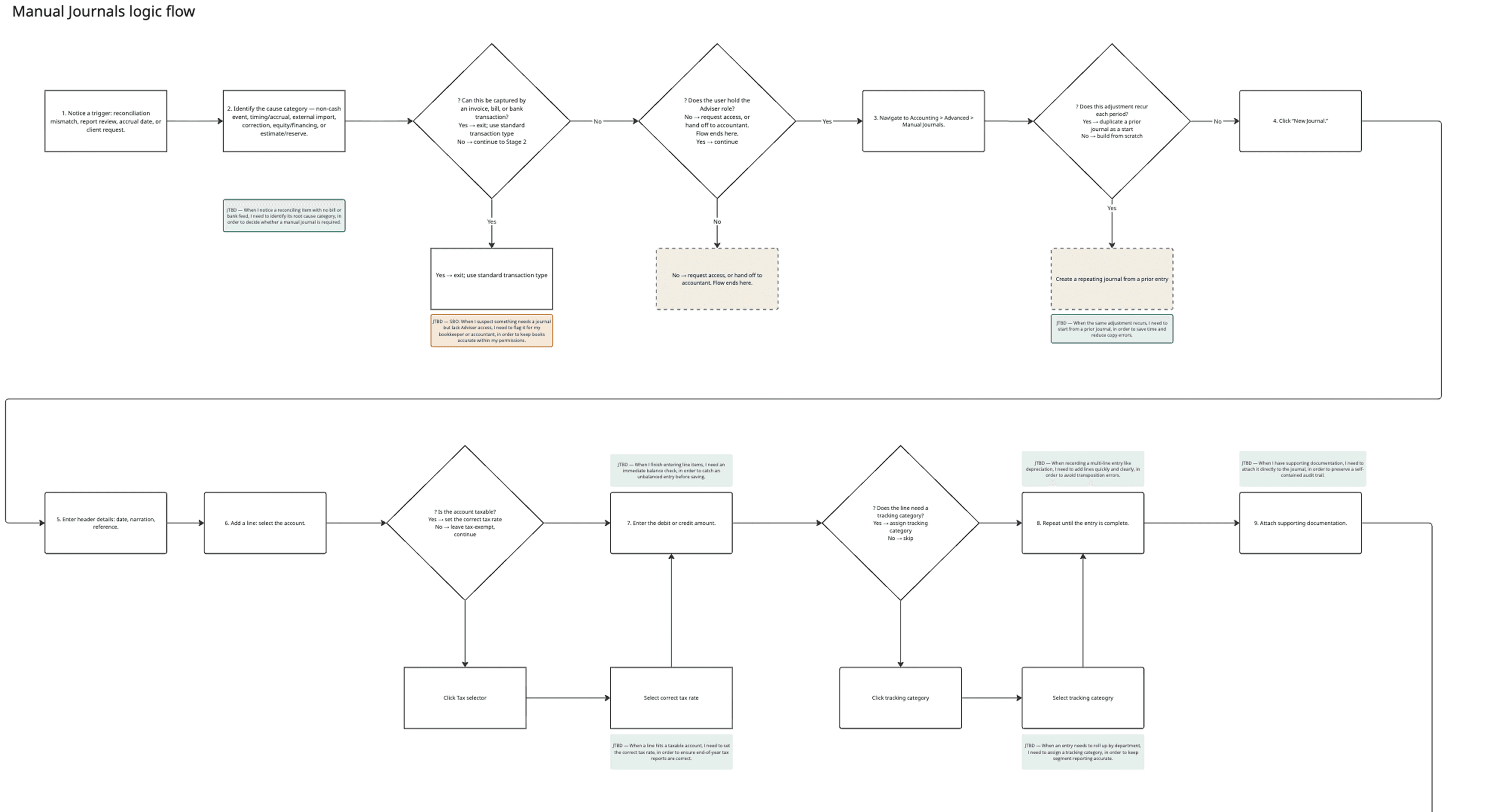
I conducted user interviews to build an end-to-end journey map, user flows and logic flows. I identified work modes of journal creation, evidence enrichment, and settings management. The journey map highlighted design gaps for each work mode. A key gap was a disconnected files and notes space, creating friction for future audits. I worked with product and internal subject matter experts to confirm these gaps.
DESIGN APPROACH
My design approach started with defining and bringing clarity to the customers jobs. I conducted expert reviews and worked with the product manager to write a design brief that outlined jobs-to-be-done, parity (posting logic and flows, permissions and reporting) vs progress (localization, task accelerators, audit context). To validate my understanding, I planned and conducted a small US research study.
CUSTOMER RESEARCH
I conducted expectancy tests with 15 US accountants and bookkeepers. Testing surfaced concrete gaps. Customers wanted global navigation restored after an initial isolation-modal layout. They also wanted an undo path for deleted lines and to move low-usage settings out of the way. Pre-rollout user testing resulted in a CSAT of 4/5.
Iterative testing improved workflow efficiency. Customers provided feedback on initial designs that led to key improvements.
- •Access to navigation. Initial layout used an isolation modal to improve focus and lift time to completion rates. Although response was generally positive regarding focus, all participants requested access to the global navigation.
- •Recover deleted lines. For long entries, accountants needed a way to recover. I added an undo and confirmation modal.
- •Nested low usage settings. Moved “Show on cash basis reports” setting into the setting menu
- •Persist secondary buttons. Based on user feedback and usage data, we persisted “Save as draft” and “Add another” actions
DESIGN EVOLUTION
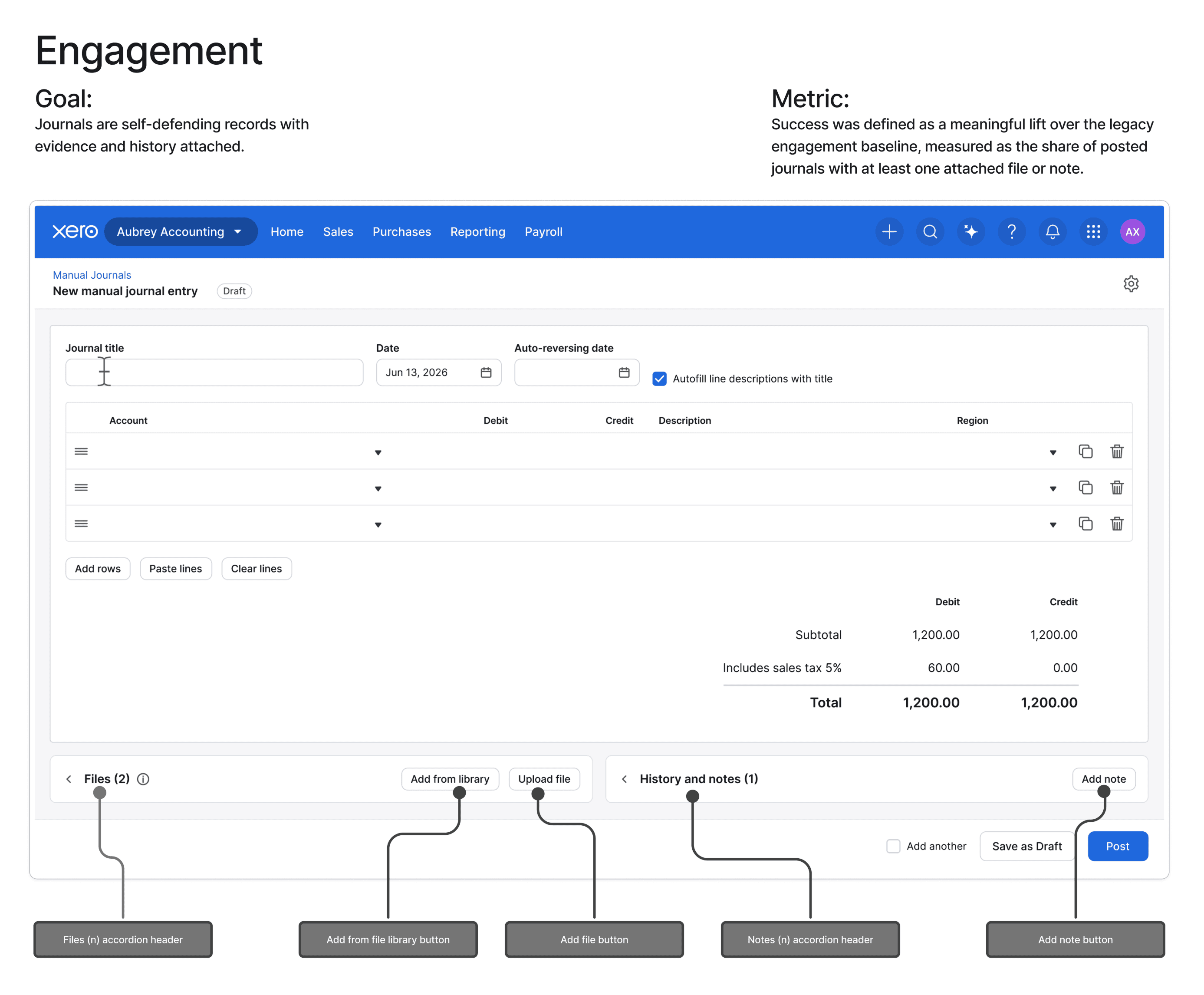
Modernization enabled me to introduce keyboard-first entry, inline calculations, auto-balancing, and table accelerators like paste-lines and clear-lines. Improving time-to-completion rates and reducing workflow errors. I unified Files, History, and Notes into one contextual audit workspace, a pattern that later became a Xero-wide files-accordion component. I added user-controlled default settings for tax and cash basis reporting to cut repetitive actions. Separate Pendo onboarding tours were built for standard and repeating journal flows, targeted to US segments.

Audit workspace with unified files and notes. Moving these tools below the input table, while placing the upload buttons in the accordion header, keeps users focused on their primary task while providing a dedicated space to add and manage supporting documents and notes.

MEASURING SUCCESS
I translated jobs-to-be-done into trackable metrics using the HEART framework, ran performance-tracking workshops with product and engineering, and configured Mixpanel dashboards spanning adoption, task efficiency, error/audit compliance, and AI engagement.
Defining goals, signals and metrics
- •Using JTBD to guide Mixpanel tracking implementation
- •Performance strategy aligned to CX and Business OKR goals
- •Metric categories include adoption, usage, task efficiency, error and data, audit and compliance, AI engagement
TECHNICAL FOUNDATION
The re-platform onto Xero's modern stack is what makes the design durable and extendable unlocking essential capabilities that impact reporting, was explicitly out of scope for this release.
AI FUTURE STATE
I worked with an internal AI team to propose a tiered framework matching AI involvement to the stakes of the decision: low-stakes formatting the system completes and the user confirms with one keystroke, real financial judgment calls like tax rates where a deliberate confirm step is required, and ambiguous cases like an imbalance, where the system flags the issue and the user decides whether it's worth a look.
IMPACT
Beyond the release itself, the work left a technical foundation that enables future capabilities faster and safer to build. It allowed for a new audit workspace that accommodates an audit work mode. As a result of the design changes, a new files component was adopted by the Xero-wide design system. This was a case of intentional design with restraint, keeping the experience familiar and faster on day one, with the right foundation for product growth.